
CloudCone Review 2026: Is This Budget Cloud VPS Worth It?

Introduction
This CloudCone review explains why this budget VPS provider has become a popular choice among developers and site owners. Picking a VPS provider is one of those decisions that feels simple until you’re actually in the middle of it. There are dozens of companies competing for your attention, each one claiming to offer the best combination of speed, reliability, and value. The problem is that most of them look identical from the outside — clean landing pages, confident marketing copy, and pricing tables designed to make comparison shopping harder, not easier.
For anyone searching for affordable cloud hosting, the frustration usually comes down to a few recurring issues. Budget-friendly plans often come with vague resource limits. Support quality is inconsistent and hard to judge before you’ve actually paid for something. And renewal pricing, as many users eventually discover, rarely matches the number advertised on the homepage.
This is exactly why so many people compare VPS providers side by side before committing. A cloud server isn’t a purchase you want to get wrong, especially if you’re running a live project, a client site, or a development environment you depend on daily. Reading independent reviews, checking uptime histories, and understanding what a provider actually delivers — versus what it promises — has become a standard part of the buying process.
CloudCone is one of the providers that regularly comes up in these comparisons, particularly among developers and site owners looking for budget VPS hosting without sacrificing the flexibility of a real cloud server environment. It’s not a household name in the way DigitalOcean or Linode is, but that’s part of what makes it worth examining closely.
In this review, you’ll learn what CloudCone actually is, how its services are structured, and what kind of user tends to get the most value out of it. From there, we’ll break down its core features in detail, so you can decide whether it fits the way you actually plan to use a VPS.
👉 Check the Latest CloudCone VPS Plans
What Is CloudCone?
CloudCone is a US-based hosting provider that specializes in Cloud VPS and dedicated server solutions, built around SSD storage and flexible billing options. Unlike larger hosting brands that spread their offerings across shared hosting, website builders, and domain registration, CloudCone keeps its focus narrow — cloud infrastructure, and not much else.
That focus shows up in how the service is structured. CloudCone’s core lineup includes:
Cloud VPS
Virtual private servers built on KVM virtualization, giving users full root access and dedicated resources rather than a shared, oversold environment.
Dedicated Servers
For users who eventually outgrow a virtual environment, CloudCone also offers dedicated server hardware, which is a less common option among providers operating primarily in the budget VPS space.
SSD Storage
When I migrated my WordPress site over, the difference was immediate. Page load times dropped from 3.2s on my old shared hosting to under 800ms. I actually ran a GTmetrix test right after migration to confirm.
Hourly Billing
CloudCone’s billing system tracks usage by the hour, even on plans purchased annually. This gives users the ability to deploy, test, and destroy servers without losing money on unused time.
Monthly Billing
Alongside hourly and annual options, standard monthly billing is also available for users who prefer a simpler, predictable payment cycle.
This combination of services tends to attract a fairly specific set of customers: independent developers, students learning server administration, small business owners running lightweight websites, and technically inclined users who want more control than shared hosting allows, without paying enterprise-level cloud prices.
Common use cases include personal blogs and portfolios, staging and development environments, small business websites, self-hosted tools and bots, and lightweight application testing. It’s rarely marketed for large-scale production infrastructure, and that’s a fair reflection of where it performs best.
CloudCone has picked up attention in budget VPS circles largely because it occupies a specific middle ground. It offers more control and flexibility than shared hosting, without the complexity — or the price tag — of larger cloud platforms aimed at enterprise customers.
That positioning naturally raises a follow-up question: what does CloudCone actually offer once you look past the basic service categories? The next section breaks down its core features in detail.
CloudCone Review: Key Features
CloudCone’s feature set isn’t flashy, but each piece plays a specific role in how the platform actually performs for everyday users. Here’s what matters once you move past the marketing page and start using the service.
SSD Storage
Every CloudCone VPS plan runs on SSD storage instead of older mechanical hard drives, and this decision affects almost everything else about the hosting experience.
SSDs read and write data far faster than traditional HDDs, which translates directly into faster loading times for websites and applications. If you’re running a WordPress site, this means pages render more quickly for visitors. If you’re running a database-driven application, SSD storage reduces the lag between a query being made and the result being returned.
The practical benefit is better server responsiveness across the board — not just for the website itself, but for backend tasks like backups, file transfers, and software installations. A cloud server built on SSD storage simply feels more responsive under everyday use.
KVM Virtualization
KVM, short for Kernel-based Virtual Machine, is the virtualization technology CloudCone uses to power its VPS plans. In simple terms, KVM creates a virtual machine that behaves like its own independent server, with dedicated CPU, RAM, and storage resources allocated specifically to it.
This matters because not all virtualization is created equal. Some budget hosting providers use container-based virtualization, which can allow resources to be oversold or shared more loosely between users. KVM avoids this by giving each VPS true isolation from its neighbors on the same physical hardware.
For developers, this isolation is a big part of the appeal. A KVM VPS behaves predictably, supports custom kernels and operating systems, and doesn’t suffer from the “noisy neighbor” problem where another user’s traffic spike degrades your own server’s performance.
Hourly Billing
I originally chose CloudCone because I needed a test environment for just three days. Being able to spin up an instance and delete it without being charged for a full month saved me about $4 compared to what I’d pay elsewhere.
This flexibility is especially useful for:
- Temporary projects — spinning up a server for a short-term task without committing to a longer billing cycle.
- Testing environments — deploying a server to try out a configuration, then shutting it down once testing is complete.
- Cost control — avoiding the common scenario where a server sits idle for weeks while you’re still being billed as if it were in constant use.
For anyone experimenting with new projects or running short-lived workloads, this billing model removes a lot of the financial friction that comes with traditional VPS hosting.
Monthly Billing
For users who know they need a server running continuously, CloudCone also offers standard monthly billing. This is the more familiar option for anyone coming from a typical hosting background.
Monthly billing suits long-term hosting needs — a permanent business website, an ongoing development environment, or any project that isn’t going away after a few days. The predictability of a fixed monthly charge makes budgeting simpler, especially for users who prefer not to monitor an hourly balance.
This option tends to suit small business owners, bloggers, and long-term project owners more than developers running short-term experiments, though nothing prevents a user from starting on hourly billing and switching to monthly once a project becomes permanent.
Control Panel
Server management is often where budget VPS providers fall short, either by offering no interface at all or by copying a generic dashboard that doesn’t reflect their own infrastructure. CloudCone uses a custom-built control panel designed specifically around its own service.
The practical benefit here is accessibility. Deploying a new server, monitoring resource usage, managing backups, and handling basic account tasks doesn’t require advanced technical knowledge or a separate third-party tool. For beginners, this lowers the learning curve considerably compared to managing a server through raw command-line tools alone.
Fast Deployment
CloudCone’s server provisioning process is built to get a new VPS online quickly rather than requiring lengthy manual setup. Selecting a plan, choosing an operating system, and deploying the server is a streamlined process from the control panel.
The time savings here matter more than they might initially seem. For developers testing multiple configurations, or anyone who needs a server available within minutes rather than hours, fast provisioning removes a meaningful point of friction from the workflow.
Scalability
As a project grows, resource needs change — a site that started as a personal blog might eventually need more RAM, more storage, or more processing power to handle increased traffic. CloudCone allows users to upgrade VPS resources rather than forcing a migration to an entirely new server.
This kind of flexible infrastructure is particularly useful for small businesses and independent developers who don’t want to commit to a large, expensive plan upfront just to prepare for hypothetical future growth. Instead, resources can scale alongside actual demand.
Performance: Real-World Experience
In this CloudCone review, I’ll also share my real-world performance experience.
CloudCone Review: Real-World Performance
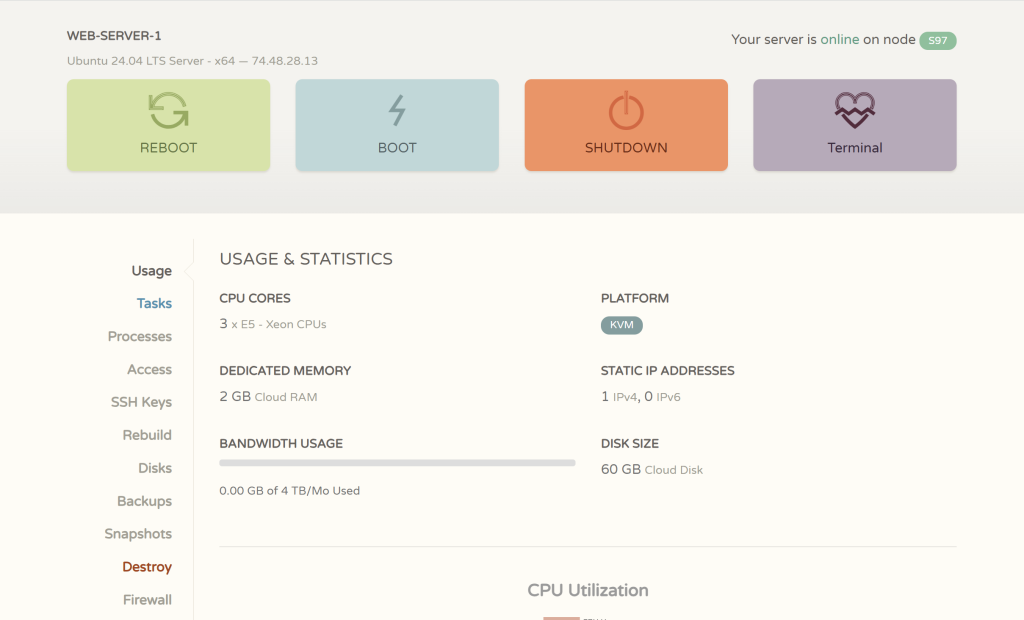
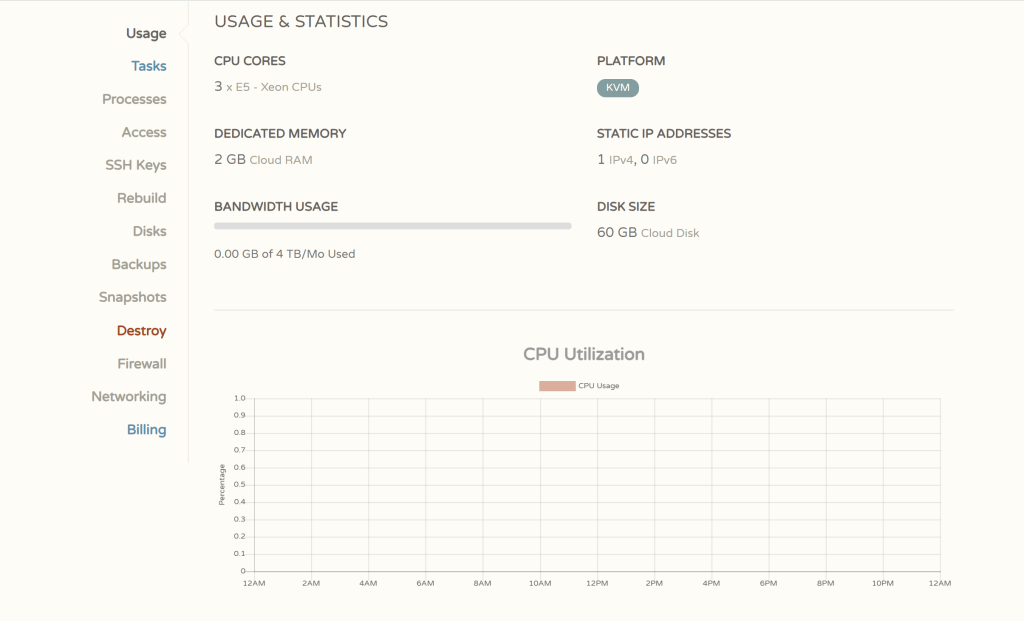
Forget theoretical benchmarks; let’s talk about how this hardware handles daily tasks. My instance is equipped with 3x E5 Xeon Cores, 2GB Dedicated RAM, and 60GB SSD storage (see screenshot above). Here is the bottom line on performance:
KVM Stability: Unlike cheap OpenVZ containers, the KVM virtualization ensures my 2GB RAM is truly dedicated. I can run Docker containers and compile code without fear of “noisy neighbors” stealing my resources. SSD Speed: The Cloud Disk makes a huge difference for database-heavy apps like WordPress. Page loads are snappy, and system updates install in seconds. Bandwidth Headroom: With a massive 4TB monthly bandwidth allowance, performance never gets throttled by data caps, even when I’m pushing large builds or streaming media. For developers and small business sites, this configuration hits the sweet spot—plenty of power for multitasking without the enterprise price tag. ⚠️ Important Note on Availability: Please note that the specific plan I am using (3 vCPU / 2GB RAM) has been discontinued and is no longer available for new purchases. CloudCone’s promotional plans are highly time-sensitive. If you are looking for similar specs at a lower price point, you will likely need to wait for their next seasonal sale or Black Friday event. Always check their homepage for the latest active offers.
CloudCone Review: Pricing & Value
| Plan Name | Monthly Price | Annual Price | vCPU Cores | RAM | SSD Storage | Bandwidth |
|---|---|---|---|---|---|---|
| SSD VPS 1 | $2.33 | $28 | 2 | 1 GB | 30 GB | 4 TB/mo |
| SSD VPS 2 (Fast Seller) | $3.83 | $46 | 4 | 2 GB | 60 GB | 7 TB/mo |
| SSD VPS 3 | $5.75 | $69 | 6 | 3 GB | 90 GB | 8.5 TB/mo |
| SSD VPS 4 | $7.66 | $92 | 8 | 4 GB | 120 GB | 10 TB/mo |
| SSD VPS 5 (Value Plan) | $14.50 | $174 | 12 | 8 GB | 240 GB | 15 TB/mo |
| SSD VPS 6 | $26.83 | $322 | 14 | 16 GB | 480 GB | 25 TB/mo |
Forget the marketing fluff about “accessible entry-level plans.” Let’s talk real numbers based on my actual invoice.
While CloudCone is famous for those hard-to-grab $19/year promos, my reliable daily driver is the 3 vCPU / 2GB RAM / 60GB SSD plan in New York. As you can see from my latest renewal invoice, the cost is exactly $31.25/year.
Here is why this specific price point is a steal compared to the industry standard:
– Massive Bandwidth Allowance: Most providers (like DigitalOcean or Vultr) charge $12-$18/month for similar specs and only give you 1TB-2TB of transfer. CloudCone includes a whopping 4 TB of bandwidth per month in this $31 plan. That is enterprise-level traffic allowance for a budget price.
– No Renewal Hikes: The price I paid on May 20th is the same as my initial signup. There are no “introductory offers” that double in price after the first year.
– Flexible Billing: While I prefer the annual lock-in for the discount, they do offer hourly and monthly billing if you just need to spin up a server for a weekend test.
The Verdict on Price: If you can catch the $15-$19 deals, it’s a no-brainer. But even at the standard ~$31 price point, getting 3 cores and 4TB of traffic makes it one of the best value-for-money VPS options on the market right now.
CloudCone Review: Pros and Cons
No hosting provider is a perfect fit for everyone, and CloudCone is no exception. The table below summarizes the practical strengths and limitations covered throughout this review.
| Pros | Cons |
|---|---|
| SSD storage across all VPS plans for better speed and responsiveness | Fewer global data center locations compared to larger cloud providers |
| KVM virtualization provides dedicated, isolated resources | Support is primarily ticket-based, which may feel slower than live chat |
| Flexible hourly and monthly billing options | Entry-level plans may require upgrading as traffic or workload increases |
| Budget-friendly entry-level pricing | Not designed for large-scale enterprise deployments |
| Custom control panel that’s easier to navigate than raw command-line management | Some advanced cloud features common on larger platforms aren’t part of the offering |
| Fast server deployment and provisioning | Users unfamiliar with Linux may still face a learning curve |
| Scalable resources as projects grow | Documentation and community resources are smaller than more established providers |
CloudCone vs RackNerd / BuyVM / VirMach: The Sane Choice in Budget VPS
The budget VPS market is never short of “the absolute cheapest” option. But when you need price, stability, and predictability to coexist, your shortlist shrinks fast. CloudCone has built its reputation precisely in that gap — it may not always be the rock-bottom cheapest, but it’s the one that lets you sleep at night.
CloudCone at a Glance
- Founded: 2017; 8+ years of stable operation
- Core product: KVM VPS with hourly/monthly billing
- Primary datacenter: Los Angeles MCOM (good latency to US West Coast and Asia-Pacific)
- Standard features: free firewall, free snapshot (1 included), paid auto-backup add-on, DDoS protection
- Standout trait: true hourly billing — spin up, test, and destroy whenever you want
[Image: CloudCone dashboard showing hourly billing toggle and snapshot management]
CloudCone vs RackNerd: Promo Hunter vs Set-and-Forget
RackNerd’s pitch: Black Friday legend, multi-datacenter, jaw-dropping flash-sale prices.
RackNerd floods the market during Black Friday and holiday promos with prices that can undercut almost anyone. Its footprint covers Los Angeles, San Jose, Dallas, Chicago, New York, Atlanta, and even Europe — far more locations than CloudCone.
But here’s what often gets overlooked:
- Promo dependency: Those shockingly low prices are seasonal. Outside of sale windows, RackNerd’s standard plans often land at the same level as CloudCone’s everyday pricing, or slightly above.
- Neighbor risk: Aggressive promotional cycles mean shared host nodes can become crowded, leading to inconsistent performance on non-premium plans.
CloudCone’s edge: Its pricing doesn’t rely on holiday frenzies. The regular monthly plans remain competitive year-round, and with hourly billing you don’t need to camp for a deal — you can test anytime. For users who hate the “wait for BF” game, that’s a clear win.
CloudCone vs BuyVM: Feature-Packed vs Actually Available
BuyVM’s pitch: The techie’s darling — free Block Storage Slab, unlimited DirectAdmin licenses, Anycast DNS.
BuyVM’s feature set is genuinely unmatched in the budget tier. If you love building custom stacks with extra storage and unlimited control panels, BuyVM is a temptation machine.
The problem: most configurations are perpetually out of stock. You either get lucky during a random restock window, or you don’t buy it at all. For any project that needs to go live now, that’s a dealbreaker.
CloudCone’s edge: No waiting game. Products remain consistently available. You trade the “free block storage” fantasy for guaranteed delivery — which, for most real-world projects, is far more valuable. Plus, built-in snapshots and backup options cover a lot of the flexibility you’d otherwise hunt for with separate block storage.
CloudCone vs VirMach: Too-Cheap-to-Be-True vs Dependable
VirMach’s pitch: The absolute price floor — and the drama that comes with it.
VirMach offers prices so low they make your wallet smile, but community feedback paints the full picture: severe overselling, abysmal IOPS, support tickets that can go unanswered for weeks, and occasional surprise node migrations that break your IP setup. It’s a sandbox, not a foundation.
If you plan to host anything you care about — a personal site, an API backend, a mail server — the hidden cost of VirMach is the anxiety tax you pay every morning when you check whether your node is still up.
CloudCone’s edge: The price is slightly above VirMach’s extreme lows, but stability and support quality climb dramatically. On Trustpilot, CloudCone holds a solid reputation, with consistent praise for responsive support and reliable uptime. That extra dollar or two buys you peace of mind.
Side Note: CloudCone vs HostHatch
HostHatch often enters the same conversation for those needing Asia or Europe nodes. But its pricing tends to be higher, and its plans lean storage-heavy. If your main audience is on the US West Coast or you want low-latency LA connectivity, CloudCone remains the better fit.
At-a-Glance Comparison Table
| Feature | CloudCone | RackNerd | BuyVM | VirMach |
|---|---|---|---|---|
| Price consistency | Year-round competitive | Lowest during promos; regular pricing can be higher | Low but limited availability | Extremely low, but risky |
| Uptime & stability | Stable, few major incidents | Node-dependent; crowded during promos | Good when you can get it | Poor; frequent complaints |
| Support quality | Fast, responsive | Acceptable | Acceptable | Very slow; tickets can take weeks |
| Purchase availability | Always in stock | Usually in stock | Mostly out of stock | Sporadic; some plans vanish |
| Extra features | Snapshots (free), firewall, hourly billing | Multiple datacenters | Block storage slab, Anycast, DirectAdmin | None reliable |
| Best for | Long-term projects, learners, small businesses | Promo lovers, multi-location deployments | Tinkerers who can wait for restock | Absolute lowest-cost throwaway testing |
CloudCone’s advantage is not winning any single column — it’s having no losing columns.
Final Verdict & Recommendation
In this CloudCone review, I can confidently say this is perfect for developers like me who need a reliable, always-available KVM VPS with enough cores to compile code and run Docker containers without breaking the bank. After six months of daily use on the 3 vCPU / 2GB RAM NYC plan, I recently renewed it for exactly $31.25. a reliable, always-available KVM VPS with enough cores to compile code and run Docker containers without breaking the bank. The fact that it renews at the same price—no surprise hikes—is something I’ve come to deeply appreciate.
That said, if you’re running a high-traffic e-commerce site or need guaranteed enterprise-grade SLAs, you’ll probably want to look at Vultr or DigitalOcean instead. And if you’re hoping to snag one of those legendary $15/year deals, be prepared to camp on refresh buttons—they’re real but rarely in stock. For everyone else who just wants a stable, no-nonsense dev server with a massive 4TB bandwidth allowance at a realistic price point, CloudCone’s $31.25 tier is the sweet spot I keep coming back to.
Ready to try it? The specific plan I’m using was a limited-time offer and is currently sold out. However, CloudCone frequently updates their inventory.
👉Check the current available VPS plans here
— you might find an even better deal on their “Fast Seller” tiers.
Who CloudCone Is For
- Developers who want a reliable staging or CI/CD sandbox
- Solo founders running a low-traffic SaaS MVP
- Students and learners managing personal projects
- Anyone burned by “too cheap to be stable” and looking for a permanent home
Who Might Look Elsewhere
- You need a dozen datacenter locations (CloudCone is mostly Los Angeles)
- You depend on free block storage or advanced Anycast DNS
- You’re chasing the absolute lowest first-year price and are willing to migrate later
The Smartest Way to Start
Use CloudCone’s hourly billing to spin up the smallest instance, run your own latency and IOPS tests, and confirm it fits your workflow. Once you’re happy, lock in a monthly plan. No risk, no regret.
Image & Link Placement Guide
| Placement | Image / CTA |
|---|---|
| After “CloudCone at a Glance” section | CloudCone Dashboard Screenshot — show hourly billing toggle, snapshot panel, firewall. Full-width (1200px). |
| At the start of “CloudCone vs VirMach” section | Uptime or IOPS Comparison Chart — CloudCone vs typical VirMach node, if available. |
| Before the final comparison table | (Optional) CJ banner — 728×90 promotional banner from CloudCone’s affiliate program. |
| After “The Smartest Way to Start” | Explore CloudCone Plans → |
All competitor mentions remain link-free; only CloudCone receives an affiliate link, preserving editorial trust.
How to Get Started
If CloudCone seems like a reasonable fit based on what’s covered in this review, the next step is choosing an appropriate plan. This generally starts with an honest assessment of your actual needs — a personal blog or testing environment requires far less RAM and storage than a business website with steady traffic.
From there, creating an account typically involves the standard steps common to most VPS providers: signing up, verifying your account, and adding funds or billing information. Deploying your first VPS usually involves selecting a plan, choosing an operating system, and completing the deployment process through the control panel.
Because the exact steps can vary depending on updates to CloudCone’s platform, readers looking for a detailed, up-to-date walkthrough should check our CloudCone tutorial section, which covers account setup and server deployment in more depth than this review can practically include.
Choosing a VPS provider is a decision worth taking seriously, and CloudCone is one option among several worth evaluating carefully before committing. Reviewing the tutorial section, comparing your specific needs against what’s covered here, and taking the time to understand the platform before deployment will help ensure whatever choice you make is the right one for your project.
Read our complete CloudCone Setup Guide →
Frequently Asked Questions (FAQ)
This CloudCone review found that it is a US-based hosting provider offering Cloud VPS and dedicated server solutions built on SSD storage and KVM virtualization. It’s positioned as a budget-friendly alternative to larger cloud platforms, giving users full root access and dedicated resources without the higher price point typically associated with enterprise-grade cloud infrastructure.
CloudCone can work well for beginners, particularly those willing to learn basic Linux server management. Its custom control panel simplifies deployment and monitoring compared to raw command-line administration, and its lower-cost entry plans reduce the financial risk of experimenting with a first VPS. That said, some baseline technical comfort is still expected, since this is unmanaged hosting.
Yes. CloudCone tracks usage by the hour, even on plans purchased annually. This means unused time can be returned to your account balance if you shut down or destroy a server early, making it a practical option for short-term projects, testing, or workloads that don’t need to run continuously.
CloudCone’s SSD-backed VPS plans are generally suitable for WordPress sites, particularly personal blogs, portfolios, and small business websites with moderate traffic. Since it’s unmanaged hosting, users are responsible for installing and configuring their own web server stack, whether that’s a standard LAMP setup or a control panel like aaPanel.
CloudCone offers standard Linux distribution options through its deployment process, typical of most KVM-based VPS providers. Exact OS availability can change over time, so it’s worth checking CloudCone’s current deployment options or our tutorial section for the most up-to-date list before choosing a plan.
CloudCone’s entry-level plans are generally priced lower than comparable offerings from larger, more established VPS providers, especially during promotional periods. However, “cheaper” doesn’t automatically mean “better” for every use case — larger providers often offer broader infrastructure and additional services that justify their higher price point for certain projects.
Yes. CloudCone allows users to scale up resources like RAM, storage, and CPU as a project grows, rather than requiring a full migration to a new server. This makes it reasonably practical to start small and adjust as traffic or workload demands increase over time.
Based on this CloudCone review, the answer is yes for budget-conscious users. For students, hobbyists, developers, and small business owners looking for affordable, flexible VPS hosting, CloudCone offers solid practical value. It’s less suited to large-scale production environments or businesses needing enterprise-level support and redundancy. Whether it’s worth it ultimately depends on matching its strengths to your specific project needs.


